

If you're evaluating a new electronic medical record (EMR) system, one of the first decisions you'll encounter is whether to choose a cloud-based platform or an on-premise solution. For many healthcare providers, the answer isn't as obvious as it once was.
A cloud-based EMR offers flexibility, automatic updates, and remote access, while an on-premise system gives organizations more direct control over their own infrastructure. Neither approach is inherently better for every practice. The right choice depends on your workflows, technical resources, security expectations, and long-term goals.
This guide explains how cloud and on-premise EMRs differ, the advantages and tradeoffs of each, and the questions every practice should ask before making a decision.
What Is a Cloud-Based EMR?
A cloud-based EMR is software that is hosted on secure remote servers and accessed through the internet.
Instead of installing the software on computers inside your office, providers log in through a web browser or supported application to access patient records, schedules, documentation, and practice management tools.
The software vendor is generally responsible for maintaining the infrastructure, applying updates, monitoring security, and managing backups.
For many small and specialty healthcare practices, this reduces the need for in-house IT resources.
What Is an On-Premise EMR?
An on-premise EMR is installed on servers owned or managed by the healthcare organization.
The practice is typically responsible for:
- Purchasing and maintaining hardware
- Installing software updates
- Managing backups
- Monitoring security
- Planning for disaster recovery
- Supporting network infrastructure
Some larger health systems prefer this model because it provides greater control over their technical environment, although it also requires significantly more internal resources.
Cloud vs. On-Premise EMR: What's the Difference?
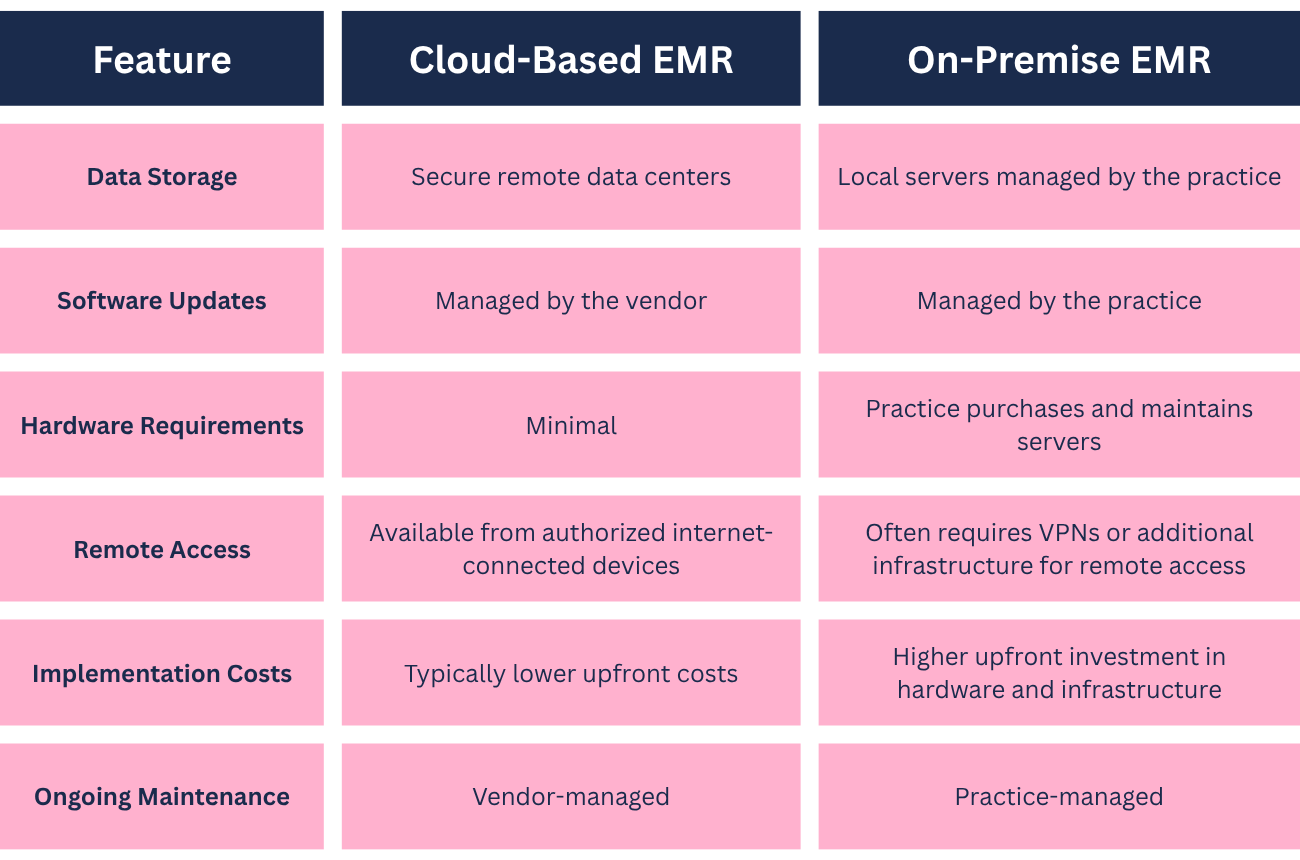
Understanding these operational differences can help determine which model best fits your organization's needs.
Benefits of a Cloud-Based EMR
Cloud-based systems have become increasingly common because they simplify many aspects of technology management.
Easier Access Across Locations
Healthcare providers increasingly work from multiple offices, satellite clinics, or remote locations.
Cloud-based EMRs allow authorized users to securely access patient information wherever they have an internet connection, making it easier to support flexible workflows.
Automatic Software Updates
Keeping software current is important for performance, security, and regulatory changes.
With many cloud-based platforms, updates are applied by the vendor, reducing the burden on practice staff and minimizing downtime associated with manual upgrades.
Lower Upfront Technology Costs
Because practices typically don't purchase and maintain their own servers, initial technology investments are often lower with cloud-based solutions.
Instead of significant hardware expenses, organizations usually pay ongoing subscription fees that include software access and infrastructure management.
Reduced IT Maintenance
Cloud vendors generally manage:
- Server maintenance
- Software updates
- Infrastructure monitoring
- Security patches
- Backup systems
This allows smaller practices to spend less time managing technology and more time focusing on patient care.
The Tradeoffs to Consider
Cloud-based EMRs offer many advantages, but they're not without limitations.
Understanding these tradeoffs helps practices make informed decisions.
Internet Connectivity Matters
Because cloud-based systems rely on internet access, a network outage can affect access to patient information.
Before choosing a platform, consider:
- Your internet provider's reliability
- Backup internet options
- Offline contingency plans
Reliable connectivity has become increasingly important for modern healthcare operations.
Vendor Reliability Is Important
When using a cloud-based EMR, your vendor plays an important role in maintaining system availability.
Ask prospective vendors about:
- Historical uptime
- Planned maintenance windows
- System monitoring
- Service level commitments
- Customer support availability
A dependable vendor helps minimize operational disruptions.
Think About Data Portability
Even if you expect to use the same EMR for years, it's worth understanding how your data can be retrieved if your needs change.
Ask questions such as:
- How can data be exported?
- Are there export fees?
- What file formats are available?
- What happens if the contract ends?
Clear answers help protect your long-term flexibility.
Questions to Ask Any Cloud EMR Vendor About Security
Security should be part of every software evaluation, not just an afterthought.
Here are some important questions to ask any cloud EMR vendor.
How Is Patient Data Protected?
Ask about:
- Data encryption while stored
- Data encryption during transmission
- Access controls
- User authentication
- Role-based permissions
Understanding these safeguards helps you evaluate how patient information is protected.
Where Is the Data Hosted?
Ask whether the vendor uses HIPAA-compliant hosting environments and how those environments are managed.
It's also helpful to understand whether third-party infrastructure providers are involved in hosting the platform.
How Frequently Are Backups Performed?
Backups help protect against accidental data loss and unexpected system failures.
Ask questions such as:
- How often are backups performed?
- How long are backups retained?
- How quickly can data be restored if necessary?
Reliable backup processes are an important part of business continuity.
What Is the Disaster Recovery Plan?
Unexpected events can happen.
Ask vendors how they prepare for situations such as:
- Hardware failures
- Natural disasters
- Cybersecurity incidents
- Regional outages
Understanding disaster recovery procedures can provide additional confidence in the platform's resilience.
Is a Business Associate Agreement (BAA) Available?
Healthcare organizations that handle protected health information should understand how responsibilities are shared between the practice and the software vendor.
Ask whether the vendor provides a Business Associate Agreement (BAA) and review its terms carefully as part of your compliance planning.
Is Cloud-Based EMR Secure?
Security depends less on whether a system is cloud-based or on-premise and more on how it is designed, maintained, and managed.
A well-managed cloud environment with strong security controls, regular updates, encryption, and reliable monitoring can provide robust protection for patient information.
Likewise, an on-premise system can be secure if it is properly maintained, but doing so often requires dedicated technical expertise and ongoing investment.
Rather than asking whether cloud systems are secure, a better question is whether a specific vendor demonstrates strong security practices and supports your organization's compliance responsibilities.
Practical Takeaways
Choosing between a cloud-based and on-premise EMR isn't simply a technology decision, it's an operational one.
As you evaluate your options:
- Understand where your data will be stored.
- Ask who manages software updates and security.
- Consider your internet reliability and contingency plans.
- Review backup and disaster recovery processes.
- Understand data export policies before signing a contract.
- Evaluate the vendor's experience supporting healthcare organizations.
Looking beyond feature lists and asking thoughtful questions will help you select an EMR that aligns with your practice's needs.
Why Many Specialty Practices Choose OptiMantra
OptiMantra is a cloud-based EMR and practice management platform designed to support small and specialty healthcare practices. Its cloud-based approach can help practices simplify day-to-day operations while providing access to essential clinical and administrative workflows.
Key advantages include:
- No on-site hardware requirements
- Cloud-based access to practice information
- Software updates managed by the platform
- Streamlined clinical and administrative workflows
- Support for growing specialty practices
- One platform for EMR and practice management
For practices looking to reduce the burden of maintaining their own technology infrastructure, OptiMantra provides a centralized platform for managing patient care and practice operations.
See how OptiMantra can support your practice with cloud-based EMR and practice management tools. Request a demo or start your free trial today.
Frequently Asked Questions
Is a cloud-based EMR better than an on-premise EMR?
Neither option is universally better. Cloud-based EMRs often offer easier maintenance, automatic updates, and remote access, while on-premise systems provide greater direct control over infrastructure. The best choice depends on your organization's workflows, technical resources, and operational priorities.
Does a cloud-based EMR require an internet connection?
Yes. Because cloud-based EMRs are accessed online, internet connectivity is generally required. Practices should consider backup internet options and contingency plans to help minimize disruptions during outages.
Are cloud-based EMRs HIPAA compliant?
HIPAA compliance depends on how a specific platform is designed, implemented, and used. Practices should ask vendors about hosting environments, encryption, access controls, Business Associate Agreements (BAAs), and other security measures as part of their evaluation.
What should I ask a cloud EMR vendor before signing a contract?
Important questions include how patient data is protected, where it is hosted, how often backups occur, what disaster recovery procedures are in place, how data exports are handled, and what level of customer support is available.



.png)